Reflection task 1: Web spaces
Blogs are an exciting educational tool that gives students the freedom to create and publish content online. This text will unpack various aspects of blogging to help teachers make informed choices about incorporating blogging into their teaching practices.
 |
| Image source: https://cdn.pixabay.com/photo/2014/08/27/08/11/blogging-428955_1280.jpg |
The inclusion of information and communication technologies (ICT) in both teaching and learning is an effective method for increasing student motivation, engagement and learning success (Ainley & Enger, 2007). One ICT subgroup that teachers can include is web spaces. As there are many web space platforms available for teachers to choose from, a short summary of a few selected web spaces is provided to develop our understanding of which web space platform may be best suited for our desired application.
Wiki's
A wiki is an online location in which multiple users can add, edit and remove information. As wiki’s are designed for collaborative work, they are a great tool in education as students can work together to share their ideas and complete group learning activities. Additionally, as a wiki somewhat resembles a word document, once provided with a brief overview, many students can use a wiki successfully. However, like most pieces of technology, wiki’s also have their downfalls with one major hindrance being that students are unable to access and modify a wiki concurrently. Additionally, as some students may see a wiki as an opportunity to maliciously target other students, it is important for teachers to familiarise themselves with the numerous security and history functions to provide access, monitor student contributions and retrieve deleted work. This link provides further insight into ways in which a wiki can be included in teaching and learning.
Websites
Websites are another way in which teachers can integrate ICT into teaching and learning. Websites provide both teachers and students with a way in which they can create and share their work with nearly endless opportunities for customisation to suit the user’s needs. Websites can also be used as a tool to embed links to other web spaces to further enhance and support learning. However, it is important to note that websites do not provide the same opportunities for collaboration, as previously discussed in the wiki overview above. This blog provides a range of different website creation platforms that can be used by teachers and students to create their own websites.
The rest of this post will take a more in-depth look at integrating blogs into the classroom for both teaching and learning.
Blogs
Blogs are an online space in which individuals can regularly share their ideas and engage in conversations both on their own and others’ blogs. As a web space, blogs allow its author an extremely high level of customisation by selecting the blog themes, pallets, and layouts. Additionally, the author can further customise their blog post by combining texts, images, videos, and links. In terms of education, this means that students can take ownership of their learning as they are provided with a choice when designing and constructing their blog.
 |
| Image source: Screenshot of my Blogger theme options |
As blogs can only be edited by the author, this negates the risk of students maliciously tapering with other students work, as previously recognised in the wiki section above. Additionally, blogs allow for high levels of security with the author able to control the visibility and permissions including who can access and comment on their blog. Personally, I see this as a useful feature as teachers can monitor student blogs and in particular moderate student comments.
 |
| Image source: Screenshot of my Blogger settings |
Blogs also provide a range of additional features including a statistics page where the author can review how many people have viewed and commented on their blog, a page detailing any earnings from the blog and the ability for the author to follow other blogs in their reading list. Whilst these features may be useful outside the world of education, I believe these will be of little use within the classroom.
 |
| Image source: Screenshot of my Blogger stats |
For the first time user, blogs are user friendly and are therefore relatively easy to create and maintain. Even myself who is only a moderate consumer of technology and has minimal experience producing technology was able to quickly learn the basic features of creating and using a blog.
Legal, safety and ethical considerations
 |
| Image source: http://contemporarysecuritypolicy.org/files/2021/02/Padlock-keyboard-key.jpg |
As with the typical classroom environment, it is the teacher’s responsibility to ensure students use blogs in a legal, safe and ethical manner. To ensure this occurs, teachers need to consider, teach and remind students about aspects of copyright, defamation and digital footprints to name a few. Additionally, as previously mentioned, blogs provide a variety of security measures and permissions that teachers should inform their students about. The New South Wales Department of Education has a range of online resources for teachers, students and parents to develop awareness around using online resources safely, legally and ethically.
Using blogs within the PDHPE learning environment
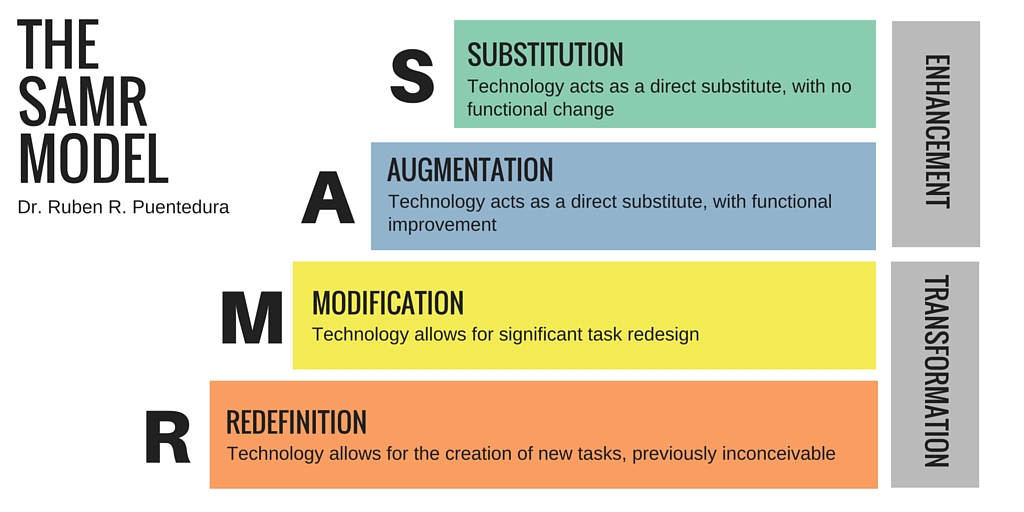
There are endless ways in which teachers and students can use blogs to enhance learning. Included below is an example of how blogs can be integrated into learning with reference to the SAMR model.
 |
| Image source: https://upload.wikimedia.org/wikipedia/commons/5/5e/The_SAMR_Model.jpg |
Substitution
For a written learning task where students are required to write about the muscles used in a particular movement, incorporating a blog post allows students to interact with technology as opposed to writing on paper.
Augmentation
For the same written learning task, a blog allows students with an ability to improve their writing through the use of tools such as spell and grammar check, thesauruses and word count. Additionally, students can embed images and videos to demonstrate a greater depth of understanding.
Modification
By completing the written learning task through a blog, the task can be modified to have students engage with peer feedback through commenting and editing their blogs in accordance with the feedback received. Additionally, to support the written task, students can use video recording devices to record each other completing the movement. Students then upload to their blog.
Redefinition
Students use a voice recording software to record audio over their video explaining which muscles are working during the movement before embedding this whole into their blog. Students blogs can be posted online for individuals outside the classroom, e.g. members of the public, industry professionals etc. to view and provide feedback.
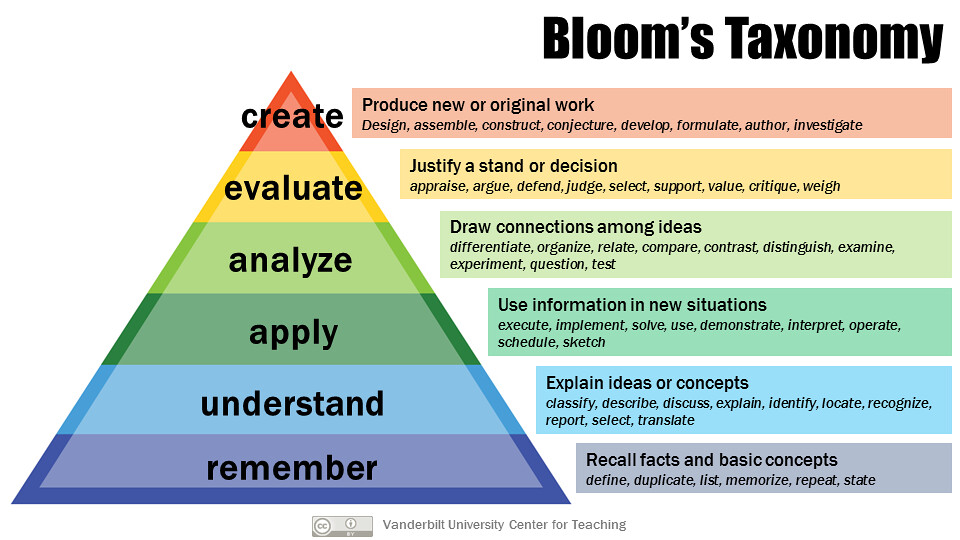
The inclusion of ICTs to modify and redefine learning activities requires students to utilise higher-order thinking as per Bloom's Taxonomy as shown below.
 |
| Image source: 29428436431_c12484fd8c_b.jpg |
Conclusion
Blogs can be used within the educative context in many ways. Our job as teachers is to ensure we provide opportunities for students to engage with not only blogs but other web spaces to provide a learning environment that is stimulating, engaging and progressive. If teachers step away from traditional teaching methods and instead integrate web spaces into their teaching and learning, I have no doubt they will be amazed at the level of student engagement, creativity and a desire to learn. I, therefore, encourage all teachers to take a chance and give web spaces a go.
Whilst this blog was created with my knowledge and experiences, I encourage all constructive feedback, particularly relating to using blogs in reference to the SAMR model.
References
Ainley, J., & Enger, L. (2007). Student use of, and engagement with, information technology. Curriculum Corporation. https://research.acer.edu.au/digital_learning/11
Ferlazzo, L. (2008). The best ways for students or teachers to create a website. https://larryferlazzo.edublogs.org/2008/12/12/the-best-ways-for-students-or-teachers-to-create-a-website/
Kurt, S. (2020). Wikis in Education: How wikis are being used in the classroom. Educational Technology: https://educationaltechnology.net/wikis-in-education/
NSW Government. (2021). eSafety – cyber security and protecting children. https://education.nsw.gov.au/teaching-and-learning/learning-from-home/teaching-at-home/using-technology/esafety


Hey Zac,
ReplyDeleteA very thorough and interesting read. I think it's great how you have gone into some explanation and detail of multiple web spaces before delving into further details of how blogs can be used within a classroom and outlining both the positives and negatives. The use of photos and links to gain further information on some topics was very useful and appropriate throughout.
When exploring the SAMR model, i love how you have provided a diagram of the mode first before applying to a HPE lesson. Have you considered incorporating more technology into the redefinition stage of the model? Perhaps the students could incorporate video footage of themselves that demonstrates specific muscle groups being used in a movement and uploading that to their blog for peer back rather than writing about the muscles.
Well done, a great an informative blog post.
Thanks,
Katy
Hi Katy,
DeleteThank you for reading and commenting on my blog. I am glad you found my explanations for each web space useful. I ensured to provide a few positives and negatives for each to allow my readers to recognise which web space would be best suited to their needs.
I am glad you found the inclusions of visuals to be useful, I too think they add depth and interest to my blog.
Thank you for your comments regarding my PDHPE activities using the SAMR model. I think your suggestions for further including ICT into the redefinition section is incredibly insightful and useful. I will ensure to modify this section of my blog to reflect your ideas.
Thank you again for taking the time to read and comment on my blog.
Zac
Hi Zac
ReplyDeleteThis is a great post! From the start, you have presented a brief overview to orientate the reader and it is followed by clear sub-headings and images to engage the reader. The learning plan under the framework of the SAMR model is clear and easy to follow. Be sure to also link this to plan to Bloom's Taxonomy so that it is clear you are aiming for the higher order thinking.
Good work!
Bec
Hi Bec,
DeleteThank you for taking the time to read and comment on my blog. I am glad you found my blog interesting and informative and I too think the visuals are great for engagement. I like your thinking relating to incorporating Bloom's Taxonomy to demonstrate higher-order thinking. I hadn't thought of this previously so I will ensure to modify my blog to reflect your ideas.
Thanks again,
Zac
Hi Zac, this was easy to read and fluent. I liked the cohesive colour scheme and profile information on your side bar! This has plenty of information for the reader interested in finding out more about SAMR in the context of your learning area and images to break up the text. Great blog post thanks. Perhaps you could add links to other blogs or webpages for readers who want to learn more.
ReplyDeleteHi Marie,
DeleteThank you for your feedback on my blog. I am glad you found my blog visually pleasing and informative. I have included a few links to other websites and blogs throughout my blog. Was there anything in particular that you would like to know more about?
Thanks again for your comment and feedback